
Agentic where it helps
A Prompt state appends its text to the master prompt for exactly as long as it is active, so "offer the annual plan if it comes up naturally" steers every turn of that phase without scripting a single line. The agent stays fluent, handles the unexpected, and phrases things itself.
Deterministic where it matters
A station parks the conversation on one question and will not release it until the answer is valid, and validity is checked by a tool, not by the model marking its own homework. A model asked to grade its own answer passes it; that is precisely why the gate sits outside the model.
Visibility as a gate
An edge from a state to an evaluation is not a step: it is a rule that says "only grade this while that is active". Questions that cannot apply yet are never asked, which keeps the agent focused and the model calls cheap.
How a State Graph Runs a Turn
Not a script being played back, and not a prompt crossing its fingers. Every turn of the conversation goes through the same four steps.
Compose
The harness assembles the prompt from named sections, including the text of every currently active Prompt state.
Grade
Every evaluation visible under the current states is answered, individually, or several together as one grouped call.
React
Each result branch fires its reactions: change state, run a tool, say a line, update a variable, send a notification.
Gate
Stations hold the conversation where it must not move on yet, released only by a check the runtime performs, not the model.
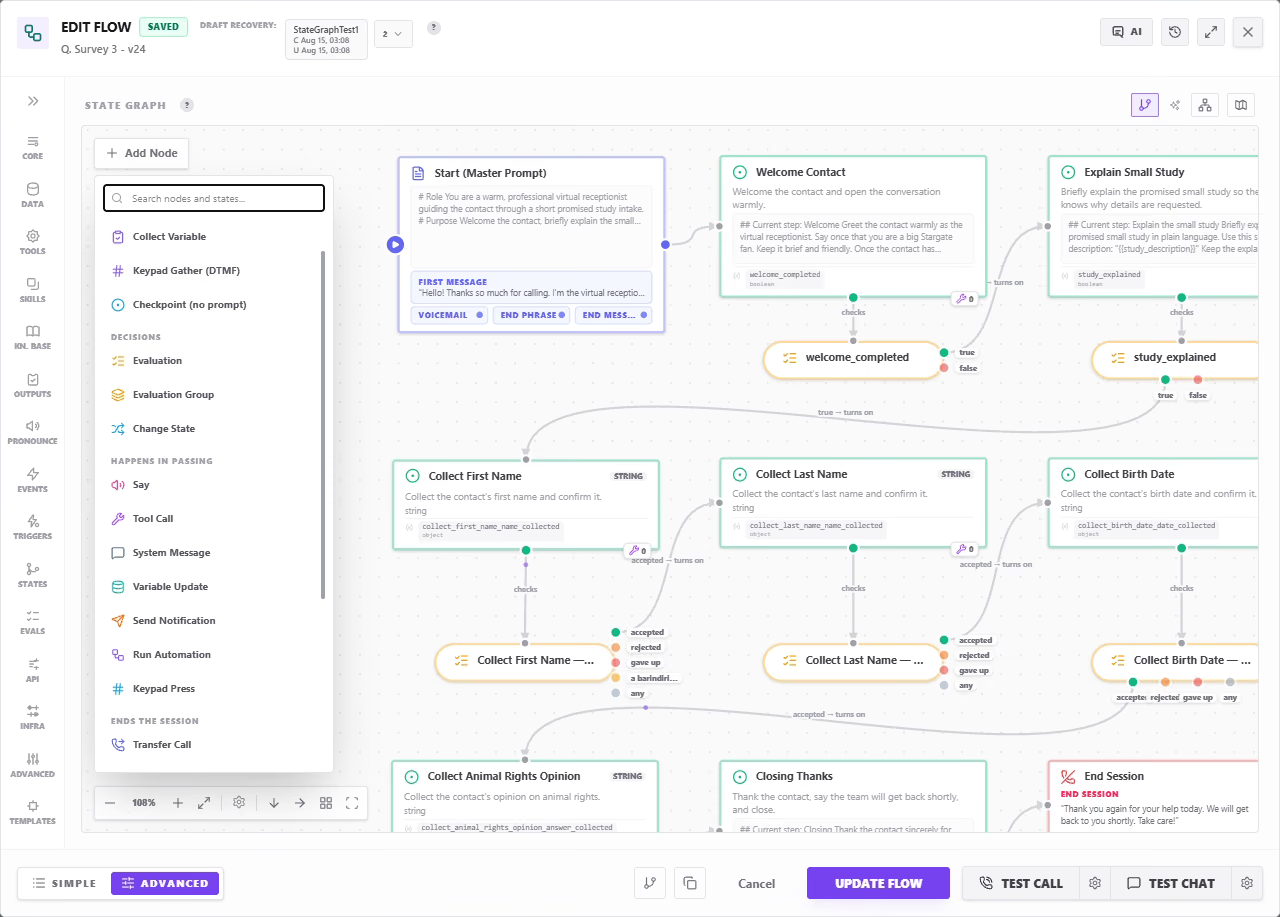
The Whole Conversation on One Canvas
The master prompt on the left, then each phase as its own state carrying the instructions for that moment. The amber pills are evaluations, graded every turn they are visible, note the collect-variable stations branching on accepted, rejected and gave up, and the Add Node palette grouping every node type by what it does to the conversation.
Node Types, Grouped by What They Do
Sorted by what they do to the conversation rather than by technical category, and the canvas draws that same distinction as shape. The swatch beside each icon is the shape that group actually takes on the canvas.
Places
The conversation sits here until something moves it on.
- State, a named condition; a Prompt state steers every turn while it is active
- Collect Variable, parks until a value passes the rules, checked by a tool
- Keypad Gather (DTMF), re-asks until the digits are in
- Recording Consent, uninterruptible, deterministic yes/no, auto-starts recording
Decisions
Where the flow's position is decided.
- Evaluation, a question graded against the conversation, every turn it is visible
- Evaluation Group, several questions answered as one model call
- Change State, a named transition applying several state changes at once
Happens in Passing
Runs, then the flow carries straight on.
- Say, exact wording, or an intent the model phrases itself
- Tool Call, as an entry action or as a branch reaction
- System Message, steers the model, the caller never hears it
- Variable Update, set, append, increment or delete in session, flow or contact memory
- Send Notification, SMS or email, out of band
- Run Automation, start a workflow mid-conversation
- Human in the Loop, pauses a Work run for a person (Work mode)
- Keypad Press, the agent dials tones through someone else's phone menu
- Start / Stop Recording, bracket a sensitive stretch of the call
Ends the Session
Terminal, the conversation does not carry on past one of these.
- Transfer Call, cold, or warm with a whisper briefing first
- End Session, the hang-up rides on the closing line, so the goodbye always completes
- Agent Handoff, another Agent takes over, with its own persona, voice and tools
- Flow Handoff, a different script, same identity, memory and state
Wiring & Notes
Structure and documentation, two of these never reach the runtime at all.
- Event, an action trigger: silence, elapsed time, the call ending
- Jump, a long hop without a wire across the whole canvas
- Note, an annotation for whoever opens this next
- Scenario, one example journey through the graph, hops numbered in order
And Quite a Bit More
The catalog keeps growing, and not every node belongs to the phone. The same graph drives calls, chats and autonomous Work agents, each mode brings its own nodes that only make sense there.
- Call, keypad gather, DTMF dialling, warm transfer, recording consent
- Chat, the same logic over web widget, SMS, WhatsApp and email
- Work, human-in-the-loop stops, sub-agent handoffs, artifact steps
The Kilevel Agent Harness
Between your graph and the model sits our own runtime. It decides what the model sees each turn, which tools it is offered, and what gets enforced rather than requested, which is where the difference between a demo and an agent you put into production actually lives.
Composed Context, Not a Prompt Blob
The harness assembles every turn from named sections, runtime protocol, flow instructions, catalogs, knowledge, skills, MCP surface, environment, tool listing, in a deliberate order. You can see which section contributed what, instead of guessing why a 6,000-token prompt behaved that way.
The Graph Compiles to Tools
Evaluations become tools the model answers, state changes become tools it calls, stations become gates the runtime enforces. Behaviour you drew is behaviour the model is structurally offered, not behaviour you asked for politely in prose.
Cost Is a Design Decision
An ungated evaluation is graded every single turn and costs a model call each time. Grouping several into one combined call, or gating them behind a state, is visible in the graph, so the price of a design is something you read off the canvas.
Edges Are the Truth
Drawing an edge from a Change State node to a state IS the activation. There is no separate list to keep in step, so the picture can never drift away from what actually runs.
Compliance You Can Point At
Recording consent as a dedicated node with a deterministic keyword match as its default answer check. An AI-disclosure opener that fires before anything else. Sensitive stretches bracketed out of the recording. Legal requirements become nodes an auditor can see, not clauses buried in a prompt.
One Graph, Every Channel
The same state graph drives a phone call, a web chat, a WhatsApp thread, an email thread and an autonomous Work run. Fix the logic once and it is fixed everywhere, no parallel scripts drifting apart per channel.
What That Makes Possible
Each of these needs both at once: a model that speaks naturally, and a rule it cannot talk its way around.
Verify identity before anything else happens
A Collect Variable station holds the caller on the date-of-birth question until it matches the record. Every evaluation about accounts and balances is gated behind the "identity_verified" state, so the agent structurally cannot discuss them early, however persuasive the caller is.
German recording consent, done properly
A Recording Consent node asks uninterruptibly, accepts "say yes, or press 1", confirms the answer with a deterministic keyword match rather than the model's judgement, and starts recording on the same turn as a clear yes. A clear no releases the station and nothing is recorded.
Take a card number without recording it
Stop Recording, run the payment collection, Start Recording again, the stretch in the middle never reaches the audio file, and the rest of the call is still one continuous recording.
A reception agent that knows when to hand over
Evaluations grade the intent each turn. Billing questions trigger an Agent Handoff to the Billing agent, its own persona, voice, tools and credentials, while the contact, memory and session state carry straight over.
Warm transfer with a briefing
Before the human picks up, they hear the whisper: "Caller is asking about a refund on order 4471; already verified." They arrive knowing who is on the line, and the caller never hears any of it.
React to what happens, not just what is said
An Event node fires on ten seconds of silence: "Are you still there?" Another fires when the call ends, running the tool that files the summary, no turn spent, nothing forgotten.
Test It Before Anyone Calls
Run simulated conversations against the graph with assertions on the outcome, grade them with benchmark judges, and schedule the whole suite nightly so a regression is caught before a caller finds it.
Versioned Like Code
Every change to a flow is a version you can inspect, compare and reapply, so an agent that behaved well last Tuesday is something you can get back.
Tools, Data Stores & MCP
Attach your own tools, MCP servers, data stores and knowledge bases. Arguments are picked from what each tool actually declares, so a call cannot be wired to a field that does not exist.
Watch It Live
During a session the canvas highlights which states are active and which evaluations just fired, so debugging an agent means watching it think, not reading logs afterwards.
Scenarios as Documentation
Record the happy path as a numbered journey through the graph, so the next person reads one route instead of inferring it from every possible branch.
All of it, buildable with AI assistance
A graph with this many node types sounds like a lot to author by hand, and you never have to. As with everything else on Kilevel, agents and their state graphs are fully creatable and editable with AI assistance, which builds everything necessary rather than only the textual prompts.
Whole state graphs, not just prompt text
Describe the conversation you want and the assistant proposes the graph itself: the session states, the evaluations with their result branches, and the nodes that react to each branch, placed on the canvas, wired to what reaches them.
Tools and integrations built from scratch
It creates the tools the agent needs, full parameter schemas, execution plans, the API calls and data operations behind them, and even the rules for when each tool is offered and when a call should be refused.
Deep prompt engineering as structure
Prompt modules, skills with their own loading modes, knowledge and data sources are composed into the layered context the harness assembles each turn, the engineering that usually takes weeks of iteration, proposed as a working starting point.
External variables wired to your data
Variables arrive with the data source behind them, the key they read, the timezone where that matters, and what to say when the lookup comes back empty, so the agent greets a caller already knowing who they are.
Email and SMS templates written automatically
Where the flow notifies someone, the assistant authors it: channel, recipient, subject line and body, plus the parameterised template layer with its conditional content, so one wording adapts instead of being copied five times.
Outputs, triggers and pronunciation too
Structured output schemas for what each call must return, action triggers for silence and timeouts, and pronunciation dictionary entries so your product names are said correctly, the details nobody remembers to configure.
Every proposal is reviewable before it lands: each suggested state, evaluation, node, tool and variable comes with the reason it is there, and you accept, reject or edit them one by one. The assistant drafts the graph, the graph is still yours.
Places, decisions, reactions, endings, wiring and documentation
The same graph drives Call, Chat and autonomous Work runs
Stations are released by the runtime, never by the model marking its own answer
What the graph shows is what runs, edges are the wiring, not a description of it