
Same Flow. Three Modes.
A flow describes what your agent can do: variables, prompts, tools, state graph, knowledge. The mode only decides where it happens: on the phone, in a chat, or autonomously in the background.
Call
A live voice conversation. Sub-second turns, interruption handling, transfers, keypad input.
Chat
Web widget, SMS, WhatsApp or email. Same logic, same tools, same memory, typed instead of spoken.
Work
Nobody on the other end. The agent pursues an objective over minutes or hours, uses real tools, and comes back with a result.
What a Work Agent Actually Gets to Use
Not "a chatbot with web search". A Work agent gets real tools: and you decide how far they reach.
Its Own Sandbox VM
A Work agent can spin up an isolated Linux sandbox and actually use it: run commands, write and read files, install what it needs, process data, and save the result as a deliverable. Tiers, maximum runtime, network access policy and whether the workspace persists between runs are all yours to set.
A Real Browser, Optionally Recorded
Navigate, click, type, extract text and take screenshots in a genuine browser session. Turn on session recording and you get a replay of every page it touched, the audit trail for anything an agent did on your behalf on the web.
It Spawns and Orchestrates Other Agents
A Work can delegate to sub-Works, each with its own flow, its own context and its own budget, and run several of them in parallel. You cap the delegation depth, the number of parallel agents, and which flows and agents it is even allowed to delegate to.
Human in the Loop, Two Ways
The agent can ask for input on its own judgement, and you can force a stop it cannot talk itself out of: a Human in the Loop node parks the run at exactly the point you chose, every time. Approval modes decide which actions never execute without a person saying yes.
It Produces Real Deliverables
Not just a chat transcript. A Work run writes stored artifacts you can open and send on, rendered HTML documents, PDFs, editable Word files, generated images, CSV and JSON data, all kept against the run that produced them.
Scheduled & Self-Scheduling
Give an agent a recurring schedule and it shows up for work on its own. It can also manage its own schedule and sleep until a condition is worth checking again, useful when the next step is simply "wait three hours, then look".
Three Things You Have to See
A browser of its own, a machine of its own, and real delegation are the claims prose earns the least credit for. So here is what they actually look like.
It drives a real browser
Not a scraper and not an API wrapper, a genuine browser session the agent navigates, clicks, types into and reads. That is what makes the systems nobody gave you an API for reachable at all: supplier portals, public registers, the tool your ops team logs into by hand every morning.
- Logs in, works through pagination, fills forms
- Optional session recording, a replay of every page it touched
- Screenshots land as artifacts you can open afterwards
It gets a machine, not a code box
An isolated Linux sandbox with a shell, a filesystem and a package manager. The agent installs what it needs, unpacks your archive, writes a script, runs it over 142 files, and saves the result out as a deliverable. You set the tier, the runtime cap, the network policy, and whether the workspace survives to the next run.
- Real shell, install anything, run anything
- Network access on an allowlist you control
- Workspace can persist between runs, or start clean
It puts other agents to work
A lead agent splits an objective into sub-Works and runs them in parallel, each with its own flow, its own context and its own budget. Results come back over a shared channel and the lead resolves the contradictions, or stops and asks you, when two of its own agents disagree.
- Delegation depth and parallel count are ceilings you set
- A whole-tree budget bounds every agent it ever spawns
- You choose which flows and agents it may delegate to at all
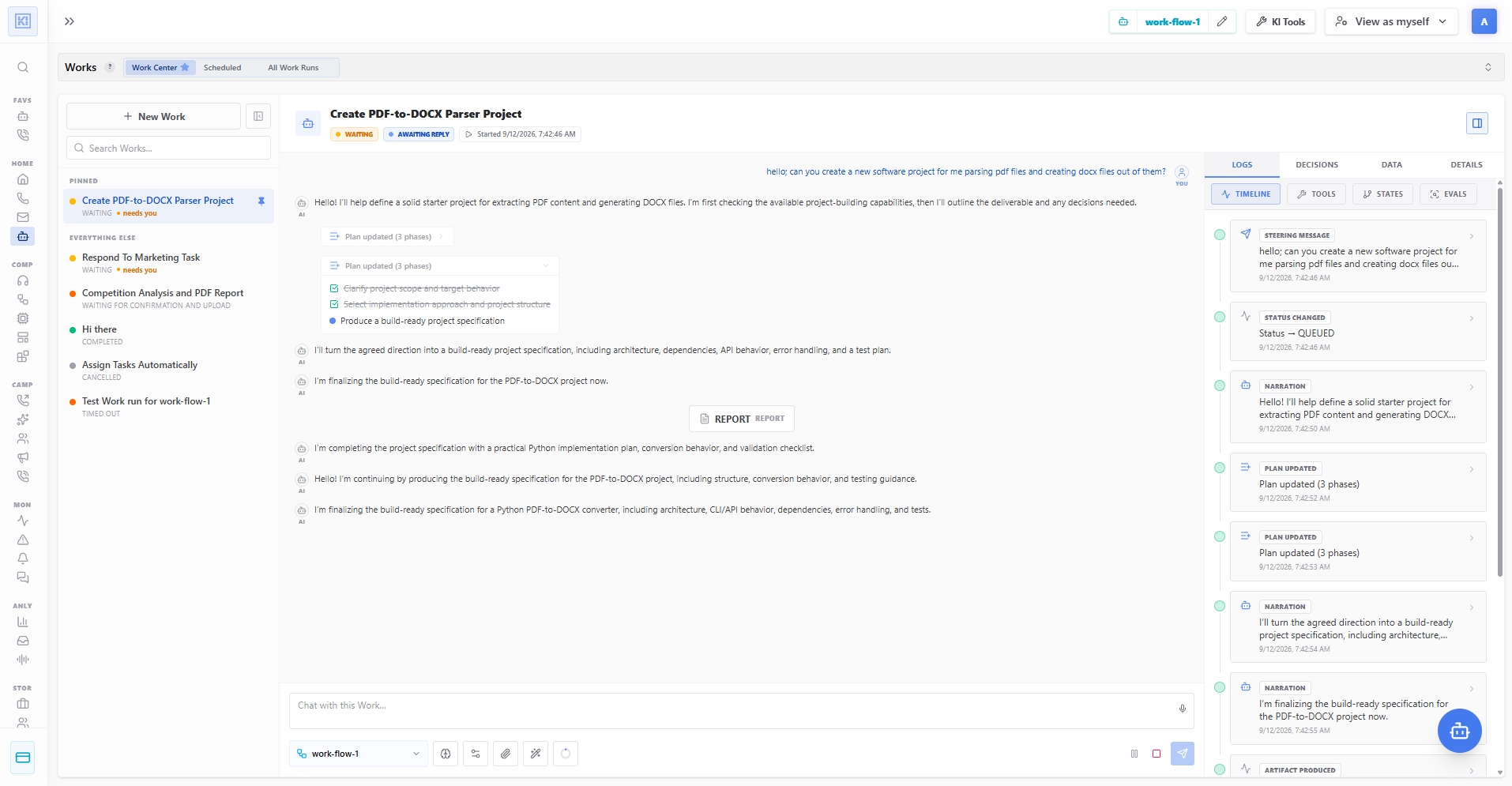
Watch the Agent Think, Step by Step
The agent works its plan phase by phase, ticking each one off as it lands, and narrates what it is doing and why. On the right, every event is on the record, steering messages, status changes, plan updates, tool calls, artifacts produced. The Works list keeps the whole fleet visible, and the ones marked "needs you" are the only ones waiting on a person.
What You Can Hand a Work Agent
The jobs that take a person half a day, which is exactly why they never get done.
Deep competitive research, delivered as a PDF
The agent opens a browser, works through a dozen competitor sites and pricing pages, pulls the numbers into a spreadsheet inside its sandbox, and writes up a structured report as a PDF. The browser recording is attached, so you can check where every claim came from.
Analyse last week's calls and say what to fix
A scheduled Work pulls every call from the last seven days, reads the transcripts, clusters the failure patterns, quantifies which ones cost the most bookings, and hands your team a ranked list of concrete flow changes, not a dashboard nobody opens.
Build and launch a calling campaign end to end
Give it the target segment and the goal. It assembles the contact list, scores it, drafts the call flow, runs simulated test calls against it, reports the results, waits for your approval, and only then launches the real campaign.
A nightly data pipeline with no infrastructure
In its own sandbox the agent downloads the export, cleans it with a script it wrote itself, reconciles it against your data store, and publishes an xlsx to the team, every night, with the run trace to prove what it did.
One lead agent, five specialists underneath
A lead Work splits a market study into five parallel sub-Works, one per region, each with its own budget, collects what they send back over the shared channel, resolves the contradictions, and writes the single report you actually wanted.
Watch a portal nobody gave you an API for
Every morning the agent logs into the supplier portal in a real browser, checks for new tenders, extracts the ones matching your criteria, and files them, with a recorded session so there is never a question about what it clicked.
Draft it, then ask before it sends
The agent prepares the customer email, the contract change or the refund, then stops at a Human in the Loop node with the full context on screen. Approve, deny, or type a correction and it continues with your answer folded in.
The glue between everything else
Work agents trigger your automations, start calls and chats, query and write your data stores, and call MCP servers and tools. Anything the rest of the platform can do, a Work agent can decide to do, on its own, at three in the morning.
Agencies: agents that work across tenants
Delegate a Work into a client workspace under an explicit permission, with its own budget and its own billing attribution, so one operations agent can serve a portfolio of accounts without the boundaries blurring.
Autonomy You Configure, Not Hope For
An agent acting on its own for hours needs hard limits. On Kilevel those are settings on the flow, not wording in a prompt.
Budgets, for Itself and for the Whole Tree
Cap spend, tokens, model calls and tool calls twice over: once for this Work alone, and once as an aggregate across every sub-Work it delegates to, recursively. An agent that spawns agents cannot outspend the ceiling you set on the tree.
Time Limits & Deadlines
A wall-clock execution cap, a default deadline for Works submitted without one, and a timeout for how long a run waits on a human before it takes the fallback you chose.
Tool Permissions & Escalation
Decide which tools a Work may use at all, which of those require approval before they execute, what happens on failure, how many times it retries, and the confidence threshold below which it escalates instead of guessing.
Context Compaction That Never Falls Over
Once a long run approaches its context limit, older history is folded into a rolling summary automatically, so a Work that has been going for hours keeps working instead of silently hitting the wall.
Durable Learnings
Let a Work promote what it learned into the flow's knowledge base, so the next run, and every future chat and call on that flow, starts out knowing it. Off by default; you decide what is worth keeping.
Channels & Event Bus
Every Work run has its own channel, and agents can subscribe to shared ones, so a fleet of agents can coordinate, hand findings to each other, and publish their thinking to a channel your team is watching.
Build your Work agents with AI assistance
Of course you do not have to configure any of this by hand, as with everything else on Kilevel, a Work flow is fully creatable and editable with AI assistance. The assistant builds whatever the agent needs to actually function, not just the prompt text.
Describe the job, get the agent
A Work flow is a flow, so the same assistant builds it: say what the agent should accomplish and it produces the working agent, instructions, tools, knowledge, state graph and all.
The tools it will need, created
Not just a note saying "connect your CRM here". The assistant writes the tool itself, its parameter schema, its execution plan, the API calls and record operations it performs, so the agent has real capabilities on day one.
Deep prompt engineering, done for you
Prompt modules, skills with their own loading strategy, knowledge and data sources are composed into the layered context the harness assembles each step, the part that separates an agent that works from one that only demos.
Templates and messages written
The emails and SMS the agent will send, subject lines, bodies, the placeholders that get filled at runtime, are authored as part of the build, along with the parameterised template layer that keeps one wording reusable across flows.
Variables wired to your data
External variables are proposed with the data source behind them and the key they read, plus what to use when the lookup returns nothing, so the agent starts a run already knowing who and what it is working on.
You stay the one who approves
Every proposal comes back as a reviewable set of changes with a reason attached to each one, and the assistant names its assumptions and asks what it still needs. Nothing is applied until you say so.
An agent building agents is not a slogan here: the same assistance that creates a Work flow also creates the automations it triggers, the call flows it launches and the tools all of them share.
An isolated Linux sandbox with a shell, a filesystem and a network policy you choose
Delegation depth and parallel agent count are ceilings you set, not defaults you accept
A self budget and a whole-tree budget across every delegated sub-Work
Every step, tool call, approval and artifact kept in the run event log