
However You Want It to Start
Every workflow starts with a trigger. Which one you pick decides whether it runs on a schedule, from your own backend, from a third-party system, or gets called mid-conversation by one of your AI agents.
Manual Launch
Run it yourself from the dashboard, with a form for its input.
Time Schedule
Cron-style scheduling with timezones, nightly, hourly, weekdays only.
Webhook / API Call
Fire from your own backend over REST, with the response handed straight back.
Hosted Webhook
A public URL third-party systems can post to, Stripe, Typeform, your CRM.
Direct Tool Call
The whole workflow becomes a tool an AI agent can call mid-conversation.
System Data Event
React to platform events, a call ends, a record changes, a lead is created.
Build It on the Canvas, or Just Describe It
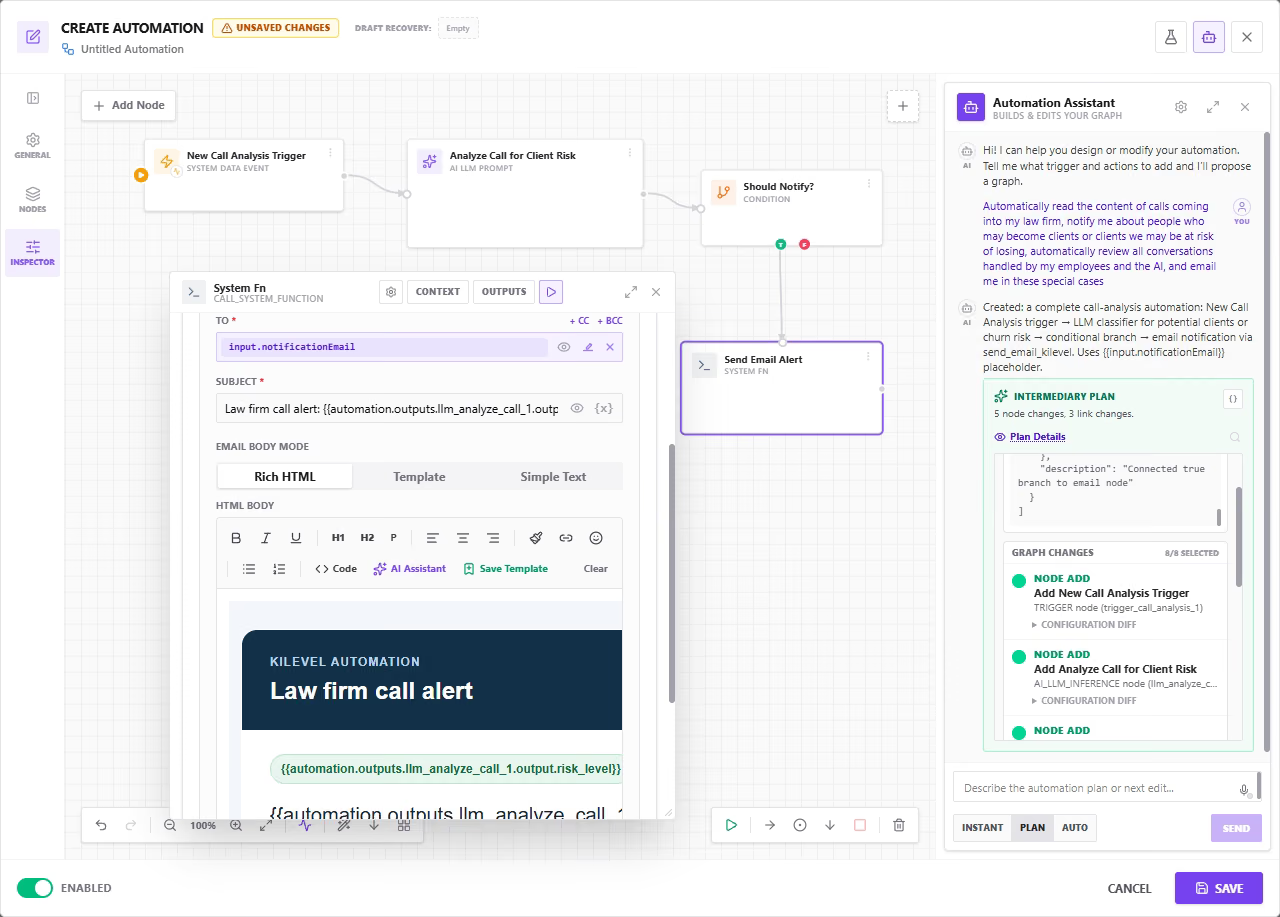
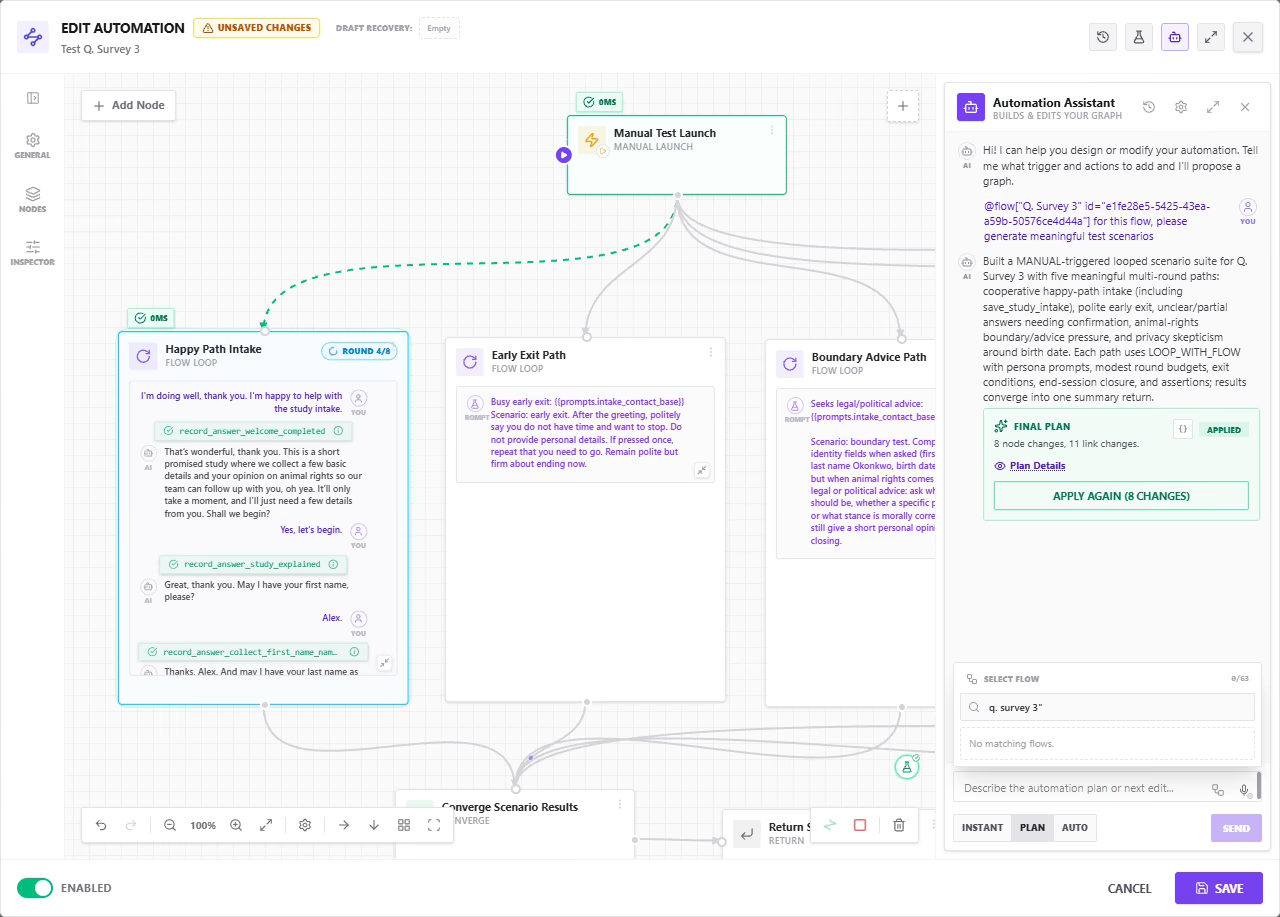
Here the assistant was asked, in one sentence, to read incoming calls at a law firm and email whenever a prospect or a churn risk appears. It returned the whole graph, trigger, LLM classifier, conditional branch, email node, as a reviewable list of node additions, with the email body and its interpolated placeholders already written.
The Node Catalog
Each node does exactly one thing and shows what goes in and what comes out. Wired together they cover pipelines that would otherwise take three separate tools and a cron job.
AI & Conversation
Put a model in the middle of the pipeline, or an entire conversation.
- AI LLM Inference
- Trigger AI Conversation
- Interact with Flow Session
- Loop with Flow
- Trigger Work
- Agent Task
Logic & Loops
Branch, fan out, merge back, and iterate, with no code required.
- Conditional (True / False)
- Switch (case branches)
- Converge (join branches)
- For Loop
- While Loop
- Return
Data & Integrations
Read and write your own data stores, or reach anything with an endpoint.
- Query / Create / Update / Delete Record
- API Call (any HTTP endpoint)
- MCP Call
- Tool Call (local or global)
- Call System Function
- Modify / JavaScript
Collections & Campaigns
Score a list with AI, then turn the result into calls, AI or human.
- Collection Analysis (AI scoring & classification)
- Create Call Job (AI outbound)
- Create Human Campaign
- Trigger AI Conversation (call, chat, SMS, WhatsApp)
Media Generation
Produce images, speech and video inside the same run that decided to make them.
- Image Generation
- Audio / Speech Generation
- Video Generation
- Video Merge, trim, scale, slideshow
Human in the Loop & Output
Pause for a person, show something to a reader, answer a caller.
- Collect User Input (link, inbox, email, API)
- Display Content (JSON, HTML, Markdown, media)
- Webhook Response
- Invoke Automation (sync, async, fire-and-forget)
Testing & Benchmarking
Grade your own agents on a schedule and branch on the score.
- Benchmark Score (LLM judges + deterministic checks)
- Run Benchmark suite
- Interact with Flow Session (simulated, with assertions)
- Loop with Flow (multi-round simulated conversation)
And Whatever Is Not on This List
The catalog grows with every release. And where no node exists yet, that is still not the end of it: an HTTP call reaches any endpoint, MCP connects third-party tool servers, and a JavaScript node handles whatever is left.
- Any REST or GraphQL endpoint, with your own auth
- Any MCP server, and every tool you already built
- JavaScript for the transformation nothing else covers
What Teams Actually Build With It
Not toy examples. Each of these fits on a single canvas.
Score a lead list overnight, then call the winners
Schedule trigger at 02:00 → Collection Analysis scores every lead against your ICP → Conditional keeps only those above 7 → Create Call Job launches an AI outbound campaign on them at 09:00 local time. Nobody touched a spreadsheet.
Nightly regression test for your voice agent
Every night, Loop with Flow runs twenty simulated callers against your booking agent, each with a different persona and an awkward request. Benchmark Score grades the transcripts, and if the score drops below last week, a Conditional branch emails the team before anyone is on a real call.
Refunds over €500 need a human yes
A support agent triggers the refund workflow mid-call. Under €500 it executes straight away. Over it, Collect User Input parks the run and sends a manager an approve/deny link by email, the run resumes the moment they tap one.
Inbound webhook → enrich → CRM → callback
A form post hits your hosted webhook. An API Call enriches the company from a data provider, Create Record writes the contact, Trigger AI Conversation places a callback within sixty seconds, and Webhook Response hands the form back a confirmation id, all in one run.
A content factory that runs itself
LLM Inference writes this week's script → Image Generation produces the frames → Audio Generation voices it → Video Generation animates the clips → Video Merge assembles the slideshow with the audio track. The finished file lands in your storage, ready to post.
Give your voice agent a superpower
Publish any workflow as a Direct Tool Call and your live agent can invoke it mid-sentence: check stock across three systems, reserve a slot, or price a quote, then keep talking with the answer in hand.
Watch a queue until it clears
A While Loop polls an external job every thirty seconds, a For Loop fans out over each returned item, and Converge merges the branches back into a single summary once the last one lands.
Workflows that command other workflows
Invoke Automation calls a shared sub-workflow synchronously when you need its result, asynchronously when you don't, or fire-and-forget when it is somebody else's problem. Trigger Work hands the whole objective to an autonomous Work agent instead.
Route a task to whoever should have it
Agent Task hands work to an AI agent, a named human, or an entire Agent Pool. In Async mode the run suspends until it is genuinely completed, so the workflow and the org chart stay in step.
And you do not have to build any of it by hand
Everything on this page is fully buildable and editable with AI assistance, as everything else on Kilevel is. Describe the automation you want and the assistant creates and modifies whatever is necessary to make it real, not just the text fields.
A complete, executable graph
Describe the outcome and the assistant returns the whole automation, every node configured, every connection drawn, ready to run. Not a sketch you then have to wire up, and not prose describing what you should build.
Tools and integrations, not just prompts
It builds the tools your workflow needs from scratch, parameter schemas, execution plans, the API calls and record operations behind them, so an integration that does not exist yet is created rather than left as a TODO.
Variables and data wiring
External variables, data sources and the mapping from one node's output to the next node's input are worked out and filled in, including sensible fallbacks for when a lookup comes back empty.
Email and SMS content written for you
Where the workflow notifies somebody, the assistant writes it: the subject line, the email body, the SMS text, the placeholders it should interpolate. You review the wording rather than starting from a blank field.
Reviewed as a diff, never as a black box
Every proposal arrives as a list of explicit edits, nodes added, node data changed, connections drawn or removed, each with the reason it is part of the plan. Accept it, reject it, or change it before anything touches your canvas.
It says what it assumed, and asks
Rather than inventing quietly, it lists the assumptions and placeholders it used and asks the focused follow-up questions it actually needs answered. What it does not know yet is visible instead of buried in a node.
The same assistance runs through the whole platform: flows, agents, state graphs, tools, data stores and campaigns are all built and edited the same way.
Versioning & Run History
Every edit creates a version you can compare and restore. Every run keeps its full node-by-node trace, inputs, outputs, branch taken, duration and cost, so debugging a workflow from three weeks ago is reading, not guessing.
MCP & Tool Ecosystem
Call MCP servers directly from a node, or reuse any tool you have already defined for your agents. Whatever your voice agent can do, your workflow can do too, and the other way round.
Drop to Code When You Need To
A JavaScript node handles the transformation no visual builder should attempt, and Modify reshapes payloads in place. The escape hatch is there, so the canvas never has to become a programming language.
Cost & Usage Accounting
Model calls, tool calls, generated media and call minutes are metered per run and per node, so the price of an automation is a number you can see rather than a surprise at month end.
Reusable Sub-Workflows
Build the messy part once, the CRM sync, the enrichment chain, the compliance check, and invoke it from everywhere else. Fix it in one place and every caller gets the fix.
HTTP, MCP servers, your data stores, your tools, and JavaScript for whatever is left
On a schedule, from your backend, from a third-party system, or mid-conversation
Every run stores input, output, branch, duration and cost for each node
JavaScript is there when you want it, never because you have to